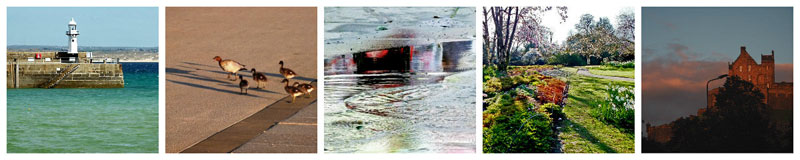
May’s theme / technique: It’s all about the Light
The six visual keys to a great photograph are:
-
- Patterns
- Texture
- Lines
- Light
- Depth of field
- Space
Being Creative with light. Photography literally means writing with light which immediately tells you how important lighting is. And with light comes shadows. Another important feature. An appreciation of light is crucial to making great photographs.
The qualities of light that affect a photograph are:
-
- brightness of light
this is fairly easy to understand; it is the intensity of light. - lighting contrasts
is the difference between highlights and shadows in a scene - specular light
or hard light can be explained by thinking how sunlight strikes an object on a bright and clear day. One side will be lit up, the other in dark shadow. - diffused light
on the other hand when it is an overcast day the sun lights the clouds and they become the source of light. Light wraps itself around the subject and reflects light into the shadows. The light is soft or diffused. - direction of light
creating depth in photographs relies on knowing the source of the light. Front light comes from behind the camera and strikes the front of the scene, usually producing a 2-dimensional image. Use bold colours or a strong colour contrast to replace the lack of shadows. Sidelight is most apparent when the sun is low and shadows are long separating foreground from the background and giving a 3-dimensional look. Backlight comes from behind the subject and can create depth and shape. If a subject is transparent then backlighting is a way to make them glow. - colour of light
Sometimes you can actually see the colour of light. The so-called ‘magic hours‘ before sunrise or after sunset can produce coloured air which can be pink or orange or golden. Everything seems to change colour. There is also the question of white balance (WB). A setting on your camera that makes things that are supposed to be white really look white. This setting can be changed either in the camera, or if you shoot in RAW, in processing.
- brightness of light
As I have previously said, I am not an expert in the technicalities of photography. I tend to use auto settings most of the time. I have altered the white balance occasionally when it has been cloudy or when photographing snow, to prevent that blueness you often get. But by all means experiment to see what difference the presets in your camera make.
This week's assignment - Use strong backlighting (i.e. shooting towards the light source, but do not look directly at the sun) to create a contre-jour image where the subject becomes a silhouette, OR shoot the light through flowers or leaves creating a transparent effect.
-
- To create a silhouette expose for the background alone – whether the sky or a brightly lit wall – so the foreground objects are recorded as very dark or even black.
- To be effective, minimal light should fall on the subject. The main point is to capture the shape and not details.
- Try to position yourself so the subject obscures the light source to eliminate bright light flaring into the lens.
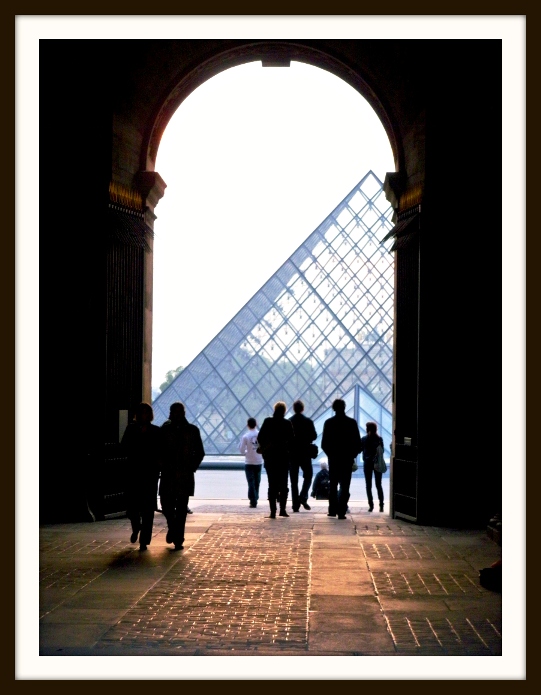
(1) This photo below is old, but one of my favourite examples of contre-jour (French for “against daylight”), coincidentally the subject is of the Louvre pyramid entrance in Paris, France. It was taken using the low winter sunlight through an entrance archway into the courtyard and capturing the figures walking through as solid shapes; as they get closer to the light you’ll notice more definition.
(2) Something I love to do more often now is to capture people on my favourite beach with the sun behind them

(3) Or silhouetted against a sunset

(4) And another favourite of mine is photographing plants and leaves with the light behind them.


If you would like to join in with the 2020 photo challenge then please take a look at my 2020 Photo Challenge page. No complicated rules, just a camera required 🙂
-
- Create your own post with some information about how you composed the shot.
- Include a link to this page in your post so others can find it too
- Add the tag #2020PhotoChallenge so everyone can find your entry easily in the WP Reader
- Get your post(s) in by the end of the month, as the new theme comes out on the first Sunday in June.

 TRAVEL WORDS
Here is my take on the challenge https://scrapydo2.wordpress.com/2020/05/25/2020-photo-challenge-21-strong-back-lighting/
I love all of these- but especially the first where the archway serves as a frame
That one is a favourite.
Finally have got it together I think
Hi Jude, my first time joining in your challenge. Love your shots 😃 Here’s mine: https://jezbraithwaite.blog/2020/05/25/into-the-light/
Welcome Jez 🙂
Love the Louvre shot! I’m not a pro photographer – but I just love to capture moments n memories – Here’s my try – https://myheart2heart.blog/2020/05/25/entwined-in-love/
I have just published a take 2 of this weeks assignment Jude. https://retiredfromgypsylife.wordpress.com/2020/05/26/20-20-photo-challenge-silhouette-take-2/
I used the new block editor and it seems to have worked ok, but, oh my, there are SO many options, not at all sure I have mastered it…
Well I guess we will be committed to it on June 1st.
The support site says the classic editor will still be available Pauline. I shall have a look at your post later as I have to leave in a minute to take the car in for a service and MOT test. And spend three hours wandering around with nothing open except the supermarket. Luckily I have George garden to look at and the beach if the tide is out.
Hope the car is ok Jude and you had a pleasant wander around the garden and beach
Fortunately she passed her test, not sure how I would have got back home after walking 5 miles in the sun, if they’d kept her! Both garden and beach were lovely 😎